 Griffith Software
Download
Version 1.0.0 · on the Chrome Web Store
Requirements. Chrome 102 or newer, on a desktop computer.
What it does
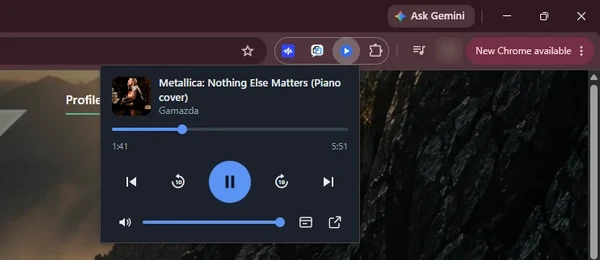
Deskside Dial adds a small control panel to your browser toolbar. While something is playing in another tab, you can play, pause, skip, seek and change the volume from the panel, or from keyboard shortcuts, without leaving the page you are on.
A pop-out button opens the same controls in a small window you can keep beside your work.
Skip ad: when YouTube shows its own Skip button on a video ad, the panel shows a Skip ad button that ends the ad, as YouTube's Skip button would, so you don't have to switch tabs. It only appears while YouTube allows that ad to be skipped. It can't skip or shorten ads YouTube doesn't let you skip, it never skips anything on its own, and it doesn't block or hide ads. Image ads (a still picture with a countdown) can't be skipped from Deskside Dial; use YouTube's Skip button or wait for the timer.
Works on: YouTube and YouTube Music in a desktop browser. It does nothing on any other website.
Deskside Dial is an independent project. It is not made by, endorsed by, or affiliated with YouTube or Google, and those names belong to their owners.
Screenshot
Details
- PlatformChrome extension
- PriceFree
- StoreChrome Web Store
- Version1.0.0
- StatusAvailable
Release notes
Version 1.0.0
First release. A small remote for YouTube and YouTube Music playing in another tab: play, pause, next, previous, 10-second skips, seek bar, volume and mute, now-playing title and thumbnail, a pop-out window, and keyboard shortcuts. A Skip ad button appears only while YouTube's own Skip button is showing on a video ad. It can't skip ads YouTube doesn't let you skip.
Keyboard shortcuts
- Play or pauseAlt + Shift + P
- NextAlt + Shift + →
- PreviousAlt + Shift + ←
These are the defaults. You can change them at chrome://extensions/shortcuts in your browser. While a skippable video ad is showing, Next (the button and the shortcut) skips the ad instead of moving to the next item.
Privacy policy
Deskside Dial doesn't send any personal data, browsing history or page content to me or to anyone else, and keeps nothing beyond the browser session described below. There are no ads, no analytics, no tracking and no accounts.
Who runs it. Griffith Software, Vinton, VA. Contact: hello@griffith.software, or the feedback page.
What it reads, and why. On YouTube and YouTube Music only, it reads what's playing (title, channel or artist, thumbnail address, playback time and volume) so the remote can show it and send your play, pause, skip, seek and volume commands to that tab. This stays inside your browser and goes only to the extension's own control panel.
What it loads from the internet. The thumbnail of what's playing, from YouTube's or Google's image servers. The image address comes from the YouTube page or is built from the video's ID. Your browser makes that request the usual way; the extension adds no information of its own.
What it stores. The ID of the last tab you controlled and of the pop-out window, in the browser's session storage, so the remote keeps controlling the same tab. Both are erased when you close the browser.
Who receives your data. No one. I don't run a server for this extension.
Retention and deletion. Nothing is kept beyond the browser session described above. Closing the browser or removing the extension deletes it. Because I hold no data about you, there is nothing for me to delete on request; you can still write to hello@griffith.software with questions.
Security. No data leaves your device apart from the thumbnail request, which uses HTTPS. The extension contains no code loaded from the internet.
Changes. If this policy changes, the new version will be posted on this page with a new effective date. If the extension ever starts collecting data, the policy will say so before that version is released.
Effective October 6, 2026
Why it asks for each permission
| Permission | What it is for |
|---|---|
| Access to YouTube and YouTube Music | Lets the extension find the playing tab and send play, pause, skip, seek and volume commands to it. It is limited to those sites. |
| scripting | Loads the extension's own helper script into YouTube tabs that were already open when you installed it, so you don't have to reload them. |
| storage | Remembers which tab you last controlled and whether the pop-out window is open. This is cleared when you close the browser. |
Free, as is
Deskside Dial is free and is provided as is, with no promise of support, fixes or new features. See the terms. Found a problem or want a feature? Use the feedback page. I read everything but can't promise a response.
Last updated October 6, 2026