 Griffith Software

Download
Not available yet. A link to the Chrome Web Store will appear here when it is released.
Requirements. Chrome 121 or newer, on a desktop computer. The YouTube interface in English.
What It Does
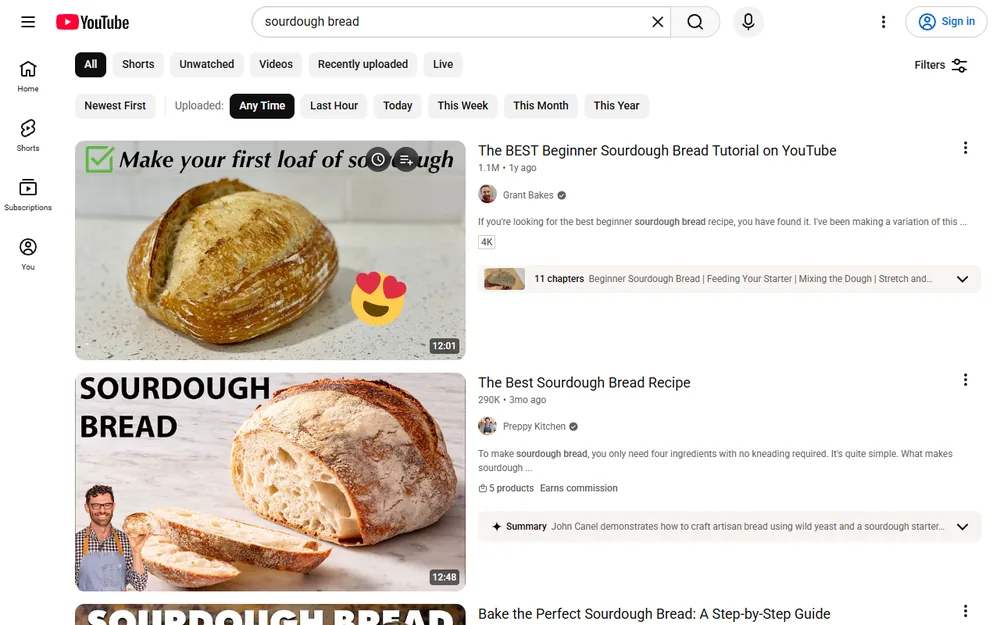
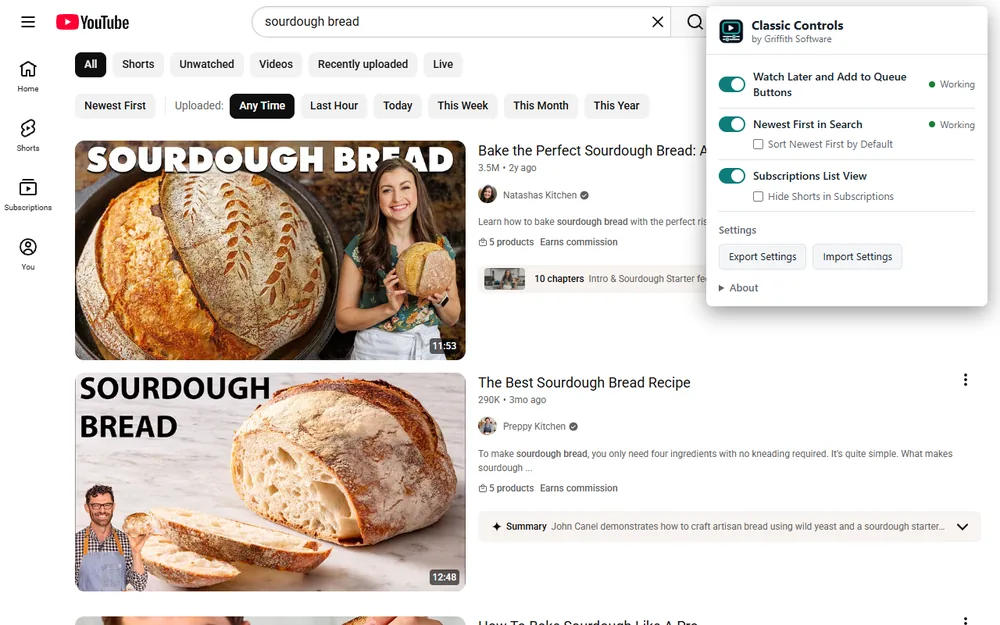
- Watch Later and Add to Queue Buttons. Hover over a video thumbnail on the home page, your Subscriptions feed or search results to get the two buttons back. A click uses that video's own menu, so the result is the same as choosing the item by hand. The buttons also show on the inline preview while it plays. Cards that still have YouTube's own buttons are left alone, and ads never get buttons.
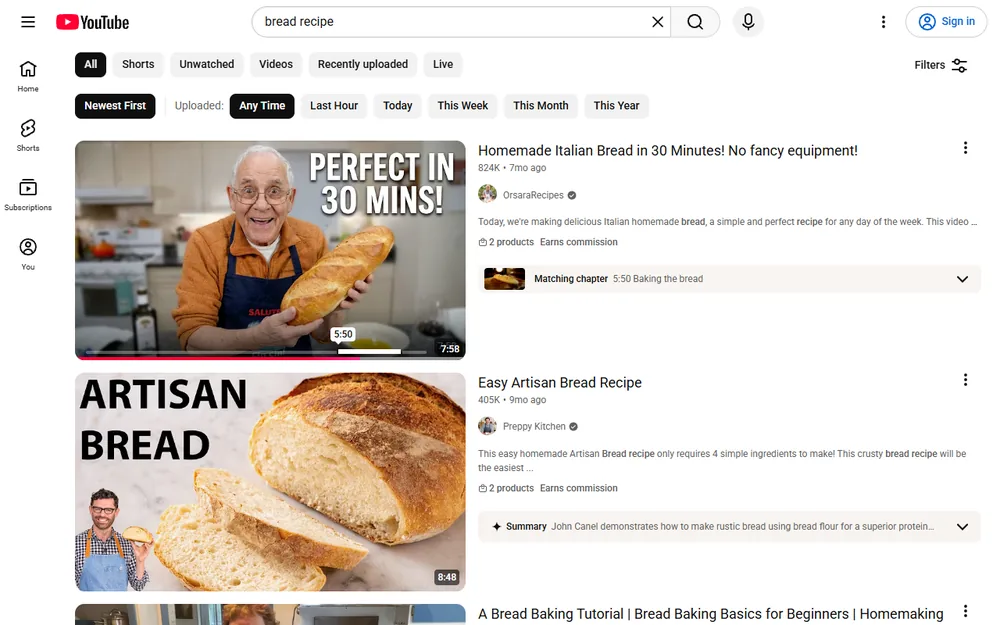
- Newest First in Search. YouTube no longer sorts search results by upload date. The Newest First button sorts the results YouTube has loaded by upload time, newest at the top, and keeps sorting as more load. It can only order what YouTube returns; it can't recreate the old server-side sort. The upload-time buttons (Last Hour, Today, This Week, This Month, This Year) apply YouTube's own upload-date filter, including Last Hour, which YouTube still supports but no longer shows.
- Subscriptions List View. Shows your Subscriptions feed as one video per row, in upload-time order. A separate switch hides Shorts from the feed.
Each fix has its own switch in the toolbar popup, and turning one off removes its changes straight away. Settings can be exported and imported.
Works On: www.youtube.com in a desktop browser. It does nothing on any other website.
Classic Controls is an independent project. It is not made by, endorsed by, or affiliated with YouTube or Google, and those names belong to their owners.
When YouTube Changes a Page
YouTube changes its pages often, and a change can stop a fix from working. Classic Controls checks itself on every YouTube page. If a fix can't find what it needs on two loads in a row, the popup says "YouTube changed this page", explains that it isn't a problem with your browser or settings, and marks the toolbar icon. The other fixes keep working, and the message clears by itself when the fix works again. Classic Controls is also tested against YouTube automatically every few hours, and fixes arrive as normal extension updates.
Screenshots
Details
- PlatformChrome extension
- PriceFree
- StoreChrome Web Store
- Version1.0.0
- StatusComing soon
Release Notes
Version 1.0.0
First release. Brings back Watch Later and Add to Queue buttons on video thumbnails (home page, Subscriptions and search, plus the inline preview), a Newest First sort for search results with Last Hour, Today, This Week, This Month and This Year filters, and a list view for the Subscriptions feed with a Hide Shorts switch. Each fix checks itself and says plainly in the popup if a YouTube change stops it.
Privacy Policy
Classic Controls doesn't send any personal data, browsing history or page content to me or to anyone else. There are no ads, no analytics, no tracking and no accounts, and I don't run a server for it.
Who Runs It. Griffith Software, Vinton, VA. Contact: hello@griffith.software, or the feedback page.
What It Reads, and Why. On www.youtube.com only, it reads the video cards on the page (the video link, thumbnail, upload time, and whether a video is live or a Short) so it can add the Watch Later and Add to Queue buttons, sort search results by upload time, and show the Subscriptions feed as a list. When you click one of its buttons, it opens that video's own menu and chooses the matching item for you. This all happens inside your browser.
What It Loads from the Internet. Nothing of its own. When it uses YouTube's menu or filters for you, YouTube's page makes the same requests it would if you had clicked them yourself.
What It Stores. Your settings (which fixes are on, Hide Shorts, and whether Newest First starts on), in Chrome's extension storage, which Chrome syncs to your other computers if you have Chrome sync turned on. While a YouTube tab is open, it also keeps each fix's status for that tab in the browser's session storage, so the toolbar popup can show whether each fix is working. That status is erased when you close the tab or the browser. Nothing about the videos you watch, your searches or your account is stored.
Who Receives Your Data. No one.
Retention and Deletion. Settings stay until you change them or remove the extension. Removing the extension deletes them. Because I hold no data about you, there is nothing for me to delete on request; you can still write to hello@griffith.software with questions.
Security. No data leaves your device. The extension contains no code loaded from the internet, and its page-matching rules ship inside the extension.
Changes. If this policy changes, the new version will be posted on this page with a new effective date. If the extension ever starts collecting data, the policy will say so before that version is released.
Effective November 18, 2026
Why It Asks for Each Permission
| Permission | What It Is For |
|---|---|
| Access to www.youtube.com | Lets the extension add the buttons, the Newest First control and the list view to YouTube pages. It is limited to that site. |
| storage | Keeps your settings, and each fix's status for the open YouTube tab so the popup can show whether it's working. The status is cleared when you close the tab. |
Free, No Guarantees
Classic Controls is free and is provided as is, with no promise of support, fixes or new features. See the terms. Found a problem or want a feature? Use the feedback page. I read everything but can't promise a response.
Classic Controls is source-available under the Apache License 2.0 with the Commons Clause. Source code on GitHub
Last updated November 18, 2026