 Griffith Software
Download
Version 4.3.3 · released October 5, 2026
- Benchdrop_v4.3.3_win-x64_setup.exe (Windows installer, 83 MB)
SHA-256:03ba42e970ca0bea3ba30d9d6898473d4fb513d32df9053b8f16bdddbc09d4c9 - SHA256SUMS.txt
All versions are on the releases page.
Check your download. In PowerShell, run Get-FileHash .\Benchdrop_v4.3.3_win-x64_setup.exe -Algorithm SHA256 and compare the result with the SHA-256 above.
Requirements. Windows 10 (22H2) or Windows 11, 64-bit (x64). Nothing else to install. Node.js is downloaded when a project needs it and your computer has no Node.js 20.19 or newer; other languages use what's already installed.
Installing. The installer puts Benchdrop in your user profile with no administrator prompt, and closes Benchdrop first if it's running. To install or uninstall silently:
Benchdrop_v4.3.3_win-x64_setup.exe /S
"%LOCALAPPDATA%\Programs\Benchdrop\Uninstall Benchdrop.exe" /currentuser /S
Windows SmartScreen. Windows may show "Windows protected your PC" when you first run a new release, because Windows has not yet seen enough downloads of it. Check that the SHA-256 shown here matches your file, then choose More info, then Run anyway. This release is not code-signed.
Support and feedback · Terms · Privacy policy · Source code
What it does
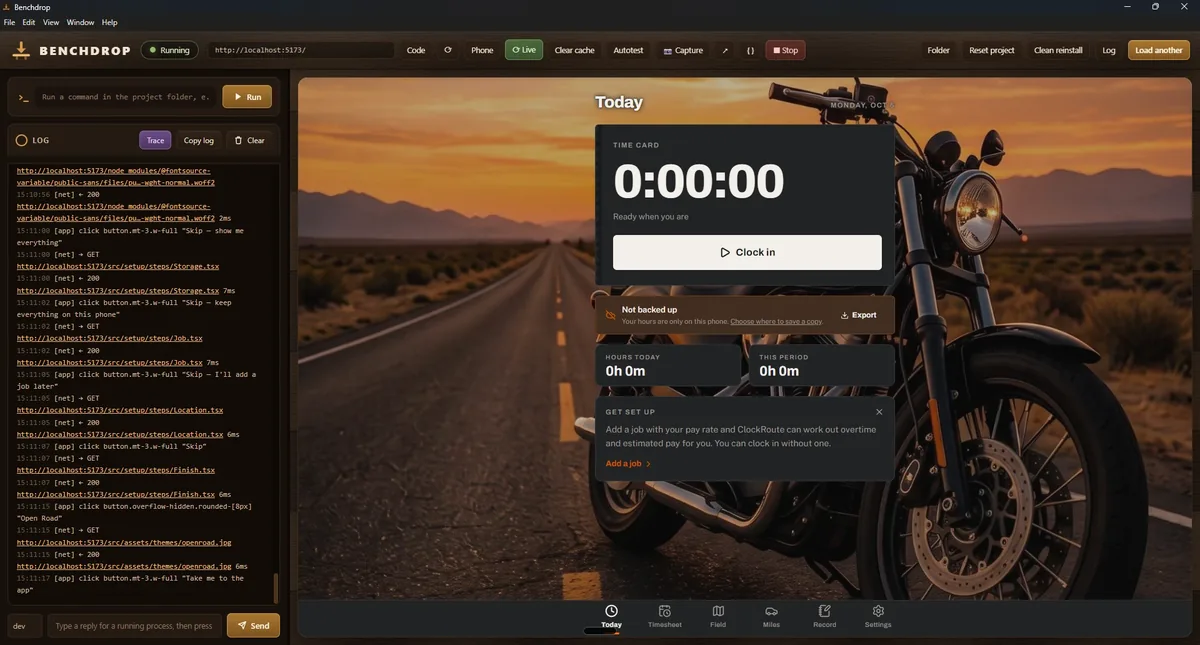
Drop in a project zip, a folder, a single file, a GitHub link or a Windows .exe. Benchdrop works out what it is, installs what it needs, runs it and shows it in its own window. A folder is used where it sits, so edits in your own editor show when the page reloads.
It runs Node.js, Python, PHP, Go, Rust, Ruby, .NET and Java projects, and plain web pages. Node.js is downloaded when a project needs it and your computer has no Node.js 20.19 or newer, and the download is checked against nodejs.org's published checksums. The other languages use what you already have installed; if one is missing, Benchdrop tells you and links to its download rather than installing it for you.
Trace records what happens in the app under test. In a web app that is clicks, typing, network requests, console messages and errors. For a Windows program it is windows, dialogs, focus, file and network activity. Fields that look like passwords or secrets are shown as "(hidden)".
Autotest clicks through the app the way a person would, filling in forms and following its navigation, and writes a report of the console errors, failed requests, crashes and hangs it saw, with the steps that led to each one and a screenshot. Anything that looks destructive or irreversible, such as "Delete all" or "Pay now", is skipped unless you tick Allow risky actions. Links out of the app are never followed, and password fields are never typed into.
Windows programs are run and watched through Windows UI Automation: their windows, controls, dialogs, crashes and "not responding" moments go into the log, Autotest works on them too, and a program can be docked inside Benchdrop's window. Until it is docked, the pane shows a live picture of the program, and clicking it brings the program's own window forward. Electron and other Chromium-based programs are started with accessibility switched on, so their buttons and fields can be seen and pressed. Standard Windows, WinForms and WPF programs work well; custom-drawn interfaces, such as games, expose few or no controls.
Phone preview serves the running app over HTTPS to a phone on the same network and shows a QR code to scan, so features that need a secure page, such as location and camera, can be tried on a real phone.
Claude connector. Claude Desktop or Claude Code can use Benchdrop directly, with your own Claude account and no API key: open a project, run it, read the screen, click through it, take screenshots and run Autotest. Benchdrop checks every action itself: it refuses risky actions, never types into secret fields, never follows links out of the app, has no tool that runs arbitrary shell commands, and logs the actions Claude takes (opening, running, clicking, testing and stopping). Help → Connect to Claude sets it up.
Works on: Windows 10 (22H2) or Windows 11, 64-bit (x64).
Benchdrop is an independent project. It is not made by, endorsed by, or affiliated with Anthropic, GitHub, the OpenJS Foundation (Node.js) or Microsoft, and those names belong to their owners.
Screenshot
Details
- PlatformWindows app
- PriceFree
- Version4.3.3
- First runWindows SmartScreen will warn
- StatusAvailable
Release notes
Version 4.3.3
First public release. Drop in a project zip, folder, file, GitHub link or Windows program, and Benchdrop installs what it needs, runs it in its own window and logs what it does. Autotest clicks through the app and reports errors. Claude Desktop or Claude Code can drive it through an optional connector. It installs for you only, with no administrator prompt. Node.js downloads are checked against nodejs.org's checksums.
Privacy policy
Benchdrop doesn't collect or send any personal data to me. There are no ads, no analytics, no tracking, no accounts and no update check. Everything it records stays on your computer unless you choose to share it, as described below.
Who runs it. Benchdrop is made by Richard Griffith, doing business as Griffith Software. Contact: hello@griffith.software, or the feedback page.
What it reads, and why. The projects and programs you open in Benchdrop, so it can work out what they are, install what they need and run them. It reads their output, and the screen text and controls of the program or page under test, so it can show them in its log, take screenshots and run Autotest. With Trace on, it also records what happens in the app under test: in a web app, your clicks, typing, network requests and console messages; for a Windows program, its windows, dialogs, focus changes, file activity and network traffic. Fields that look like passwords or secrets are logged as "(hidden)" and are never typed into by Autotest or Claude.
What it loads from the internet. Only what you ask for:
- Node.js from nodejs.org, the first time you run a Node project on a computer that doesn't have a suitable Node.js. Benchdrop checks the download against nodejs.org's published SHA-256 list before using it.
- A project from GitHub or a zip link, when you paste the link.
- Whatever the project's own tools download when you run it (for example
npm install, pip or Maven packages). - A Google search for selected text, in your browser, only when you choose "Search the web for this". Links you click open in your browser.
What it stores. On your computer, in %APPDATA%\benchdrop: your settings, the list of recent projects (their file paths), unpacked projects and the archives they came from, screenshots, Autotest reports, the downloaded Node.js, the certificate used for phone preview (with your computer's local network address), the test browser's cookies and storage for the apps you test, and connector.json (the local port and a random token for the Claude connector). During an install or update, the installer leaves a short-lived flag in %ProgramData%\Benchdrop, which it removes when it finishes.
Who receives your data. I don't. I don't run a server for Benchdrop. Two optional features send data elsewhere, and only when you use them:
- Claude connector. If you connect Claude Desktop or Claude Code, and a conversation uses Benchdrop's tools, Benchdrop sends the screen text, control labels, screenshots, log lines and Autotest reports that Claude asks for to your own Claude app on this computer. That app sends them to Anthropic as part of your conversation, under your Claude account and Anthropic's terms. Benchdrop itself never contacts Anthropic and handles no Claude credentials.
- Phone preview. While it is on, the project you're previewing can be opened by any device on your local network, not only your phone. What the phone does is logged on your computer.
Retention and deletion. Everything stays until you delete it. Uninstalling from Installed apps asks whether to delete Benchdrop's data, and keeps it if you choose No. You can also delete the %APPDATA%\benchdrop folder yourself at any time. Because I hold no data about you, there is nothing for me to delete on request; you can still write to hello@griffith.software with questions.
Children. Benchdrop is a general-purpose tool for people who build and test software. It is not directed at children, and it collects no data from anyone, including children.
Security. The Claude connector listens only on this computer (127.0.0.1), refuses requests from web pages, and requires the random token in connector.json. Phone preview uses HTTPS with a certificate made on your computer, but has no access code: turn it off on a network you don't trust. Benchdrop runs the projects you open with your own rights, so only open projects you trust.
Changes. If this policy changes, the new version will be posted on this page with a new effective date. If Benchdrop ever starts collecting data, the policy will say so before that version is released.
Effective October 5, 2026
Why it asks for each permission
| Permission | What it is for |
|---|---|
| Runs programs with your rights | Running the projects and programs you open, and the tools they need (for example npm install). It never asks for administrator rights. If you connect Claude, it can also start the projects and programs you point it at. Only open projects you trust. |
| Reads and controls other programs' windows | Windows UI Automation and keystrokes, used only on the program you are testing, so Benchdrop can read its controls, run Autotest and dock it. |
| Internet | Downloading Node.js and the projects you link to, and whatever the projects' own tools download. Benchdrop has no update check or analytics. |
| Local network (phone preview only) | Serving the running app to your phone while phone preview is on. Windows may ask to allow this through the firewall the first time. |
| Local connections on this computer | A web server for plain pages, a proxy that logs a Windows program's web traffic, and the Claude connector. These listen on 127.0.0.1 only. |
Free, as is
Benchdrop is free and is provided as is, with no promise of support, fixes or new features. See the terms. Found a problem or want a feature? Use the feedback page. I read everything but can't promise a response.
Last updated October 5, 2026