 Griffith Software

Download
Version 1.1.0 · released November 2, 2026
- DocStudio-Setup-1.1.0.exe (Windows installer, 94 MB)
SHA-256:5e876b155a16e9782fdcb7841dbb18c8605c809a7cbb47a05a5ebfbce36a55c8 - SHA256SUMS.txt
All versions are on the releases page.
Check Your Download. In PowerShell, run Get-FileHash .\DocStudio-Setup-1.1.0.exe -Algorithm SHA256 and compare the result with the SHA-256 above.
Requirements. Windows 10 (22H2) or Windows 11, 64-bit (x64). Nothing else to install. When Microsoft Word, Excel or PowerPoint, or LibreOffice, is installed, Doc Studio uses it for older formats (.doc, .xls, .ppt) and some conversions; everything else works without them.
Installing. The installer puts Doc Studio in your user profile with no administrator prompt, shows the license and offers a desktop shortcut (unticked). Uninstalling asks whether to keep your Doc Studio data. To install or uninstall silently (a silent uninstall keeps your data):
DocStudio-Setup-1.1.0.exe /S
"%LOCALAPPDATA%\Programs\Doc Studio\Uninstall Doc Studio.exe" /currentuser /S
License. Doc Studio is source-available under the Apache License 2.0 with the Commons Clause: you may use, modify and share it free of charge, but you may not sell it. See LICENSE and NOTICE.
Windows SmartScreen. Windows may show "Windows protected your PC" when you first run a new release, because Windows has not yet seen enough downloads of it. Check that the SHA-256 shown here matches your file, then choose More info, then Run anyway. This release is not code-signed.
Support and feedback · Terms · Privacy policy · Source code
What It Does
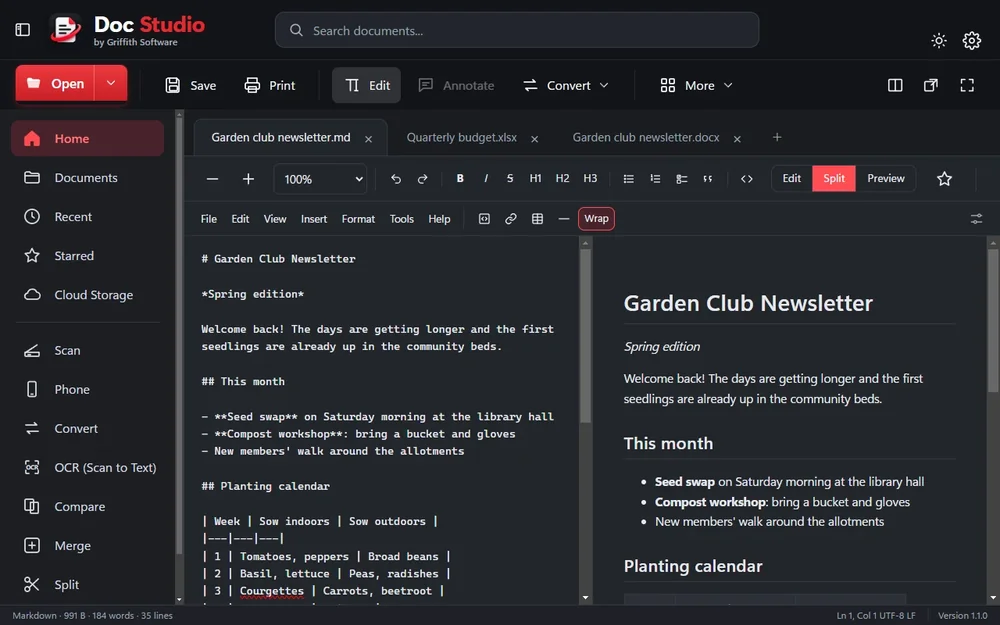
Doc Studio opens and edits .docx, .doc, .rtf and .odt documents, .xlsx, .xls, .xlsb, .ods and .csv spreadsheets with formulas and charts, and .pptx, .ppt and .odp presentations, and saves them back in their own format with their formatting kept. PDFs can be annotated, filled in, signed and rearranged. Markdown files have Edit, Split and Preview views. It also opens text, web pages, EPUB books, JSON, XML and pictures, and makes new files of most of these types from Home or the + tab.
Tools. Convert (one file or many), OCR (the text in scans, photos and PDFs, read with the text recognition built into Windows), Compare two versions, Merge files into one PDF, Split a PDF, Compress, Scan from a scanner connected to your PC, and Phone: scan a QR code with your phone's camera to send photos and files to your PC, or from your PC to your phone, over your home Wi-Fi. No app is needed on the phone.
Pictures. Crop, rotate, adjust, filters, drawing, text, resize and remove background (worked out on your PC), then save as PNG, JPEG, WebP or BMP.
Your Work Is Kept Safe. Every save keeps a copy in the version history (the newest 40 per file), a backup is made before a file is first overwritten, and unsaved work is copied every few seconds, so it can be recovered after a crash or power cut.
Office Programs. When Microsoft Word, Excel or PowerPoint, or LibreOffice, is installed, Doc Studio uses it in the background for the closest results with older formats (.doc, .xls, .ppt) and some conversions. Everything else works without them.
AI Assistants (Optional). Claude Code, Claude Desktop, Gemini CLI and OpenAI Codex can use Doc Studio to read, create, convert, merge and split documents. It is off until you switch it on in Settings > AI assistants. They create new files only, may change only files an AI made (asking you first for files from an earlier session), and never delete anything.
Works On: Windows 10 (22H2) and Windows 11, 64-bit (x64).
Doc Studio is an independent project. It is not made by, endorsed by, or affiliated with Microsoft, Google, Anthropic, OpenAI or The Document Foundation (LibreOffice), and those names belong to their owners.
Screenshot
Details
- PlatformWindows app
- PriceFree
- LicenseApache License 2.0 with the Commons Clause (source-available: free to use, modify and share, not to sell)
- Version1.1.0
- First RunWindows SmartScreen will warn
- StatusAvailable
Its source code is on GitHub. Where the license differs from the terms on this site, the license applies to Doc Studio.
Release Notes
Version 1.1.0
Spreadsheets and Word documents now look the same in View and Edit: View is read-only, Edit unlocks the same page. Spreadsheets edit like Excel or Google Sheets, CSV files open in the grid (with a Text mode), and copied cells get a moving border. Word documents show real pages in Edit, with headers, footers and page breaks. Pages no longer break early in View. New Support This App button: pay what you want, one time or monthly, if you choose.
Version 1.0.1
First public release. Source-available under Apache 2.0 with the Commons Clause (free to use, modify and share, not to sell). Open, edit, create and convert documents, spreadsheets, presentations, PDFs and Markdown on Windows, keeping each file's formatting. Tools: Convert, OCR, Compare, Merge, Split, Compress, Scan and Phone transfer. Picture editor with background removal. Version history, backups and recovery of unsaved work. Optional AI assistant support, off until you switch it on. No account, ads or tracking.
Keyboard Shortcuts
- New Markdown fileCtrl + Shift + N
- New documentCtrl + N
- OpenCtrl + O
- Save / Save asCtrl + S / Ctrl + Shift + S
- PrintCtrl + P
- Switch between view and editCtrl + E
- Find / Find and replaceCtrl + F / Ctrl + H
- Search documents and commandsAlt + /
- Next tabCtrl + Tab
- Close tabCtrl + W
- Zoom in / out / actual sizeCtrl + = / Ctrl + - / Ctrl + 0
- Compact modeCtrl + Shift + F
- All keyboard shortcutsCtrl + /
Privacy Policy
Doc Studio collects no personal data. It has no account, no ads, no analytics, no tracking and no update check, and Griffith Software receives nothing from it. Your documents are opened, edited and saved on your PC. Doc Studio uses the internet only for the dictionary lookup you ask for, described below.
Who Runs It. Doc Studio is made by Griffith Software, Vinton, VA. Contact: hello@griffith.software, or the feedback page.
What It Reads, and Why.
- The documents and pictures you open, so it can show, edit, convert and save them.
- The names of documents in your Documents, Desktop and Downloads folders and in cloud folders already synced to your PC (OneDrive, Google Drive, Dropbox, iCloud Drive, Box), so the search box can find them. It reads only file names for this, not the files, and it never contacts those cloud services.
- Which programs open each file type, when you use Settings > Default apps.
- Pages from your scanner (Scan tool) and the text in pictures (OCR tool), using the scanner support and text recognition built into Windows, on your PC.
- When Microsoft Word, Excel or PowerPoint, or LibreOffice, is installed: for older formats and some conversions, Doc Studio opens a temporary copy of the file in that program in the background (read-only, with macros off) and deletes the copy afterwards.
- When you open Settings > AI assistants: whether Claude Code, Claude Desktop, Gemini CLI or OpenAI Codex appear to be installed (it checks that their folders exist; it reads and changes nothing inside them).
What It Loads from the Internet.
- Dictionary (Tools > Dictionary): when you press Look up, the word is sent to dictionaryapi.dev, a free public dictionary service, which sends back its definitions. Like any web request, this also gives that service your IP address. Nothing else is sent. The Dictionary window says this before each lookup.
- Links in a document open in your web browser when you click them.
- Support (Support This App, on Home, in About, in Settings and in the Help menu): opens Griffith Software's support address on griffith.software in your web browser, which forwards to Griffith Software's page on Buy Me a Coffee, only if you choose it. Doc Studio itself sends nothing. Buy Me a Coffee handles support payments, under its own privacy policy, only if you choose to support. Doc Studio stores nothing about who supported it.
- Nothing else. Pictures that a document links to on the internet are not loaded when you view or convert it.
On Your Own Network.
- Phone (the Phone tool): while the Phone window is open, Doc Studio runs a small web page on your PC so your phone can send and receive files. It answers only devices on your local network that have the code in the QR code. The connection is not encrypted, so use it on a network you trust, such as your home Wi-Fi. It stops when you close the window, after 15 minutes unused, or when Doc Studio closes, and the files received from the phone are then deleted from the temporary folder (save any you want to keep). If Windows asks whether to allow Doc Studio on networks, choose Private networks only. Windows keeps that choice as a firewall rule until you remove it in Windows Security.
- AI Assistants (off until you switch them on in Settings > AI assistants): while switched on, Doc Studio listens for the Doc Studio connection of an AI assistant on your PC only (it is not reachable from other devices), protected by a random key that is made new each time the connection starts. Doc Studio itself sends nothing off your PC. But when an assistant reads a document through Doc Studio, the text goes to that assistant, which handles it under its own maker's terms (Anthropic for Claude, Google for Gemini, OpenAI for Codex). Switch AI assistants off to stop this.
What It Stores. On your PC, in %APPDATA%\Doc Studio:
settings.json: your recent files (the last 12), starred files, theme, and whether AI assistants are on.versions: a copy of a file each time you save it in Doc Studio (the newest 40 per file), with its path.backups: a copy of a file before Doc Studio first overwrites it (the newest 50).recovery: copies of documents with unsaved changes, made every 5 seconds and removed when you save, close or discard them.ai-files.json: the files AI assistants created, so they may change only their own files.ai-bridge.json(the connection key, while AI assistants are on and Doc Studio is running) andinstall.json(where Doc Studio is installed).- Preferences such as toolbar layout, the name you give for comments and tracked changes, your scanner settings, and citations you add to a document, in the program's local storage; words you add to the spelling dictionary; and the program's caches.
Elsewhere on your PC: the file-type icons in %LOCALAPPDATA%\Doc Studio Icons; short-lived working files in your temporary folder (removed after each task or when Doc Studio closes); and Windows' own Recent files list, which Doc Studio adds the files you open to.
Who Receives Your Data. No one, except:
- dictionaryapi.dev, which receives each word you look up;
- devices you connect with the Phone tool, which receive the files you offer them;
- an AI assistant you connect, which receives what it reads through Doc Studio.
Griffith Software receives nothing.
Retention and Deletion. Everything Doc Studio stores stays on your PC until you delete it (version history and backups also drop their oldest copies, and recovery copies go when you save or discard). When you uninstall Doc Studio, it asks whether to delete your Doc Studio data as well; you can also delete the folder %APPDATA%\Doc Studio yourself at any time. Griffith Software holds no data about you, so there is nothing to request from us.
Children. Doc Studio is a general document program, not aimed at children. It collects nothing from anyone.
Security. Doc Studio's windows run with the web content sandbox on, without scripts from the internet. The Phone and AI assistant connections each need a random code, and the AI assistant connection only accepts connections from your own PC. Files you receive from your phone are kept in a temporary folder only while the Phone window is open. The program is not code-signed (see the download section).
Changes. New versions of this policy are posted on this page with a new date. A change to what Doc Studio collects or sends is announced here before that version is released.
Effective November 2, 2026
Why It Asks for Each Permission
| Permission | What It Is For |
|---|---|
| Files you open and save | Reading and saving the documents you choose. Doc Studio runs with your own rights and never asks for administrator rights. |
| File names in your folders | The search box lists documents in Documents, Desktop, Downloads and synced cloud folders by name. |
| File associations and Default apps | Offers Doc Studio for 35 document types in Open with, adds "Open with Doc Studio" to the right-click menu, and lists it in Windows' Default apps. Windows only lets you choose a default yourself; Doc Studio never sets one. |
| File Explorer icons | Gives files that open in Doc Studio an icon for their type, through a small icon add-on registered for your Windows user. Removed when you uninstall. |
| Internet (Dictionary only) | Sends the word you look up to dictionaryapi.dev, only when you press Look up. There is no update check or analytics. |
| Local network (Phone only) | While the Phone window is open, a page on your PC that your phone opens with the QR code. Windows may ask to allow this through the firewall; choose Private networks. |
| Local connection on this PC (AI assistants only) | While AI assistants are switched on, the Doc Studio connection for Claude, Gemini or Codex, on 127.0.0.1 only, with a random key. Off until you switch it on. |
| Word, Excel, PowerPoint or LibreOffice (when installed) | Opening a temporary, read-only copy in them, with macros off, for older formats and some conversions. |
| Scanner | Scanning pages from a scanner connected to your PC, through Windows' own scanner support, when you use Scan. |
Free, No Guarantees
Doc Studio is free, source-available under the Apache License 2.0 with the Commons Clause (you may use, modify and share it, but not sell it), and is provided as is, with no promise of support, fixes or new features. See the terms. Found a problem or want a feature? Use the feedback page. I read everything but can't promise a response.
Last updated November 2, 2026