 Griffith Software

Download
Version 1.0.0 · released November 21, 2026
- CCSecrets_v1.0.0.zip (1.4 MB)
SHA-256:28f9d4b05671393b428a6a435d3471deb4674392f8ceaac2fe5a2a7164221be2 - CCSecrets_v1.0.0.zip.sha256
All versions are on the releases page.
Check Your Download. In PowerShell, run Get-FileHash .\CCSecrets_v1.0.0.zip -Algorithm SHA256 and compare the result with the SHA-256 above.
Requirements. Windows, Claude Code, Node.js 22 or later, and Git Bash. CC Secrets works on Windows only, in Claude Code: the terminal, the IDE extensions and the desktop app's Code tab. On any other system it says it works on Windows only and does nothing.
Installing. In Claude Code 2.1.275 or later, type this:
/plugin install cc-secrets --marketplace Griffith-Software/CC-SecretsFrom the zip instead: unzip it somewhere it can stay, then run claude plugin marketplace add "/path/to/CCSecrets" and claude plugin install cc-secrets@cc-secrets.
Support and Feedback · Terms · Privacy Policy · Source Code
What It Does
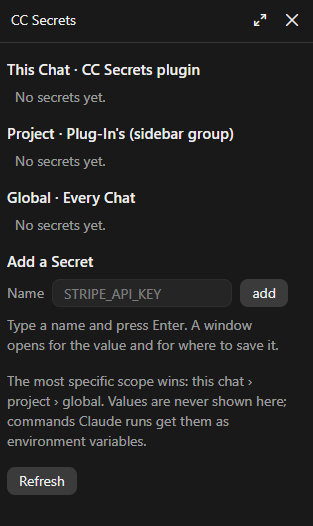
CC Secrets keeps API keys, tokens and passwords at three scopes: one chat, every chat in a project (a desktop sidebar group or a folder), and every chat. When two have the same name, the most specific one wins.
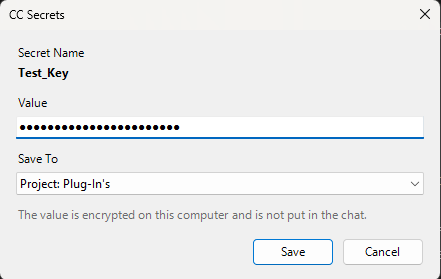
- Typed in a Window, Not the Chat. When a task needs a key, Claude asks for it by name and a small window opens on your screen. You type the value there with the characters hidden. Claude is told only that it was saved, never the value.
- Given to Commands, Hidden in Their Output. Commands that need secrets get them as environment variables. If a value shows up in any tool's output, Claude sees
[NAME]in its place, including when the value is escaped for XML or JSON, URL-encoded or in base64. - Takes Over Password Prompts. When a script stops to ask for a password, Claude can save it as a secret and hand it to the script itself instead of passing the step to you.
- Makes Passwords. It makes new random passwords (for a keystore or a database) and saves them without anyone seeing them.
- A Panel Beside the Chat.
/secretslists the names in each scope, with Add, Replace Value, Show Value, Move and Remove. Show Value's Copy button keeps the value out of clipboard history and cloud sync and clears the clipboard after 30 seconds.
Screenshots
Details
- PlatformClaude Code plugin · Windows only
- PriceFree
- LicenseApache 2.0 with the Commons Clause (source-available)
- Version1.0.0
- StatusAvailable
CC Secrets is free to use, change and share under the Apache License 2.0 with the Commons Clause, which doesn't allow selling it. That makes it source-available rather than open source. Its source code is on GitHub. Where the license differs from the terms on this site, the license applies to CC Secrets.
Release Notes
Version 1.0.0
First public release.
Privacy Policy
CC Secrets runs only on your computer. It has no server, makes no network connections and collects nothing.
Who Runs It. CC Secrets is made by Griffith Software. Contact: the feedback page.
- Stores: your secrets in
~/.claude/cc-secrets/, each value encrypted with AES-256-GCM. The key is protected by Windows Data Protection for your Windows account, so another user or another computer can't open it. Nothing is stored in a project folder, and there's no sync. - Reads: the Claude desktop app's own files, for each chat's name and sidebar group, and the chat's transcript, only for the chat's name. It doesn't change them.
- Clipboard: only when you press Copy in the Show Value window, and it clears the clipboard 30 seconds later.
Effective November 21, 2026
Free, No Guarantees
CC Secrets is free and is provided as is, with no promise of support, fixes or new features. See the terms. Found a problem or want a feature? Use the feedback page. I read everything but can't promise a response.
Last updated November 21, 2026